
InfraRSI: Harnessing Recursive Self-Improvement for Training Infrastructure InfraRSI:用递归自我改进优化大模型训练基础设施
Command Once, and Self-Evolve: Your Personal Infra Agent for All Environments.
InfraRSI is a harness for training infrastructure: it makes the model training of your existing codebase faster, in whatever environment it runs. InfraRSI 是一个面向训练基础设施的 Harness,普适于各种环境,帮助你提升既有代码库的模型训练效率。
Real speedups, beyond knob tuning 加速显著,不止于调参
InfraRSI changes code as well as launch settings: fused kernels, compiled attention, memory savers paired with memory-hungry settings. Across four dense and MoE workloads it reaches a 1.83× geometric-mean speedup (up to 2.75×) and lifts mean MFU from 17.4% to 30.0%, ahead of RE-Bench (1.37×), Auto-Research (1.34×), and the knob-only OptiCo (1.23×). InfraRSI 不只调启动参数,还会修改代码:融合算子、编译注意力、把耗显存的设置与省显存的设置配对。在四个稠密与 MoE 训练负载上,几何平均提速 1.83×(最高 2.75×),平均 MFU 从 17.4% 提升到 30.0%,领先 RE-Bench(1.37×)、Auto-Research(1.34×)和只调参数的 OptiCo(1.23×)。
General: any task, codebase, or LLM service 通用:适配各种任务、代码库与 API 服务
Megatron-Core, FSDP2/TorchTitan, DeepSpeed, HF Trainer/TRL, and native PyTorch DDP; dense and MoE models; one node or many. Hand it a launch script, a train.py, or a whole repository. It tunes CLI flags, environment variables, and config keys, and patches only the files you allow. Drive it with Claude Code or Codex (your existing login), the DeepSeek API, Anthropic or OpenAI APIs, any OpenAI-compatible endpoint such as OpenRouter or SiliconFlow, or a self-hosted vLLM server.
支持 Megatron-Core、FSDP2/TorchTitan、DeepSpeed、HF Trainer/TRL 与原生 PyTorch DDP;稠密模型与 MoE 均可,单机多机都行。可以直接交给它启动脚本、train.py 或整个代码仓;它会调整命令行参数、环境变量和配置项,并且只修改你允许修改的文件。大模型后端可以是 Claude Code 或 Codex(直接复用登录态)、DeepSeek API、Anthropic 或 OpenAI API、OpenRouter 和硅基流动等任意 OpenAI 兼容接口,或自建的 vLLM 服务。
RSI: learns, and carries it to new hardware RSI:持续积累经验,快速迁移到新硬件
Every verified run is written back as reusable experience, so each job improves the next. On Qwen3.5-9B (8×H100), experience from other GPU types alone lifted the final speedup from 1.70× (cold start) to 1.82× and reached 90% of the peak in 9 trials, which the cold start did not reach within its budget. 每次验证过的运行都会写回为可复用的经验,前一个任务让下一个任务做得更好。在 Qwen3.5-9B(8×H100)上,仅借助其他 GPU 型号的经验,最终加速就从冷启动的 1.70× 提升到 1.82×,并在第 9 次试验就达到 90% 峰值,而冷启动在预算内始终没有达到。
Easy: one command 易用:一条命令
infrarsi optimize ./train.sh
InfraRSI drafts the task, measures your baseline, searches, verifies the winner against your original job, and writes infrarsi_optimized.sh. It confirms the plan with you first (Enter keeps the defaults), accepts constraints in plain language, and works with the Claude Code or Codex login you already have, or any API key.
InfraRSI 自动生成任务描述、测量基线、搜索、把最优结果与原始任务对比验证,并输出 infrarsi_optimized.sh。开跑前会先和你确认计划(一路回车即用默认值),支持用自然语言提约束,可直接复用已登录的 Claude Code 或 Codex,也可使用任意 API Key。
Rigorous: strict harness checks, optional multi-model review 严谨:Harness 强验证 + 可选多模型检查
Every candidate must keep the same workload, data, optimizer steps, and loss within your tolerance, and the winner must reproduce its speedup in a fresh re-run against your baseline. Optionally, a second model cross-checks proposals and reviews code patches before they run. 每个候选都必须保持训练负载、数据、优化器步数不变,Loss 偏差在容差之内;最终胜出者还要在与基线背靠背的新复测中再次跑出加速。还可以选择开启第二个模型,交叉检查方案并在代码补丁运行前审阅。
Talk to It Before It Runs 开跑之前,先和它对齐
InfraRSI now confirms its plan with you before spending any GPU time, takes your constraints in plain language, and can optionally bring in a second model to cross-check its ideas. InfraRSI 现在会在占用任何 GPU 时间之前和你确认计划,支持用自然语言提出约束,还可以选择引入第二个模型来交叉把关。
Interactive startup Q&A 交互式启动问答
In a terminal, infrarsi optimize and infrarsi run walk through the settings one by one before any GPU time: training command, GPUs, what may change and what must stay fixed, loss tolerance, targets, budget, model, the dual-model option, and your requirements.
在终端里运行 infrarsi optimize 或 infrarsi run 时,它会在占用 GPU 之前逐项确认设置:训练命令、GPU 数量、哪些可以改、哪些必须保持不变、Loss 容差、目标、预算、所用模型、是否启用双模型,以及你的需求。
- Enter回车 keeps the value shown, so pressing Enter all the way runs the default setup. 保留当前显示的值;一路回车即使用默认配置。
-
a/q/?accept the rest, quit, or explain the current item.noneclears an optional item. 分别表示接受其余全部、退出、解释当前项;none清空可选项。 -
Saved自动保存
Answers that change the task are written to
infrarsi.yaml; the previous version is kept asinfrarsi.yaml.bak. 修改任务设置的回答会写回infrarsi.yaml,原文件保留为infrarsi.yaml.bak。 -
Skip it跳过问答
Scripts, pipes, CI, and
--resumeare never asked; pass--yes(or--no-interactive) to skip it in a terminal. 在脚本、管道、CI 中或使用--resume时不会提问;在终端里也可以加--yes(或--no-interactive)跳过。
$ infrarsi optimize ./train.sh --llm codex-cli
InfraRSI will make this training job faster, measured and
verified as the same job (the time per update is the only
objective).
Confirm the settings below. Enter keeps the value shown;
`a` accepts the rest; `q` quits; `?` explains this item;
`none` clears an optional one.
[1/22] Training command [bash train.sh]:
[2/22] Config file [configs/qwen_9b.yaml]:
[3/22] GPUs per node [8]:
...
[11/22] Loss tolerance [0.03]: 0.01
...
[13/22] Target speed-up [none]: 1.6
...
[21/22] Dual-model debate at proposals [off]: y
  a second model is needed: the next item asks for it
[22/24] Second model (for the debate) [none]: claude-cli
[23/24] Patch checker (for the debate) [the model that did not write the patch]:
[24/24] Requirements in your own words [none]: 不能改优化器
    another requirement (Enter: done): batch 不能超过 4
    another requirement (Enter: done):

These settings will be used:
   ...
Start? [Enter: yes; a number: change that item; q: quit]Requirements in natural language 用自然语言提需求
Write constraints the way you would tell a colleague, in any language. A model compiles them once into knob values, constraints, frozen files, or required checks; every result is then checked against them, and you see what each requirement was turned into before the run starts. 像跟同事交代一样写下约束,中英文均可。模型会把它们一次性转换成旋钮取值、约束条件、冻结文件或必须通过的检查;之后每个结果都会据此校验,并且在开跑前就让你看到每条需求被理解成了什么。
- Narrow only只收紧不放宽 Requirements can only narrow the search or add checks. Anything no field can enforce is passed to the model as guidance and reported as not checked. 需求只能缩小搜索范围或增加检查。无法用具体字段强制执行的内容,会作为指导提供给模型,并在报告中标注为"未校验"。
-
Safe stop安全拦截
A requirement that would change the objective, widen the search, or override a setting that has its own flag (such as the tolerance) stops a non-interactive run before any GPU time, unless you pass
--requirements-partial. 如果某条需求试图改变优化目标、放宽搜索范围,或覆盖有独立参数的设置(如 Loss 容差),非交互运行会在占用 GPU 前停止,除非加上--requirements-partial。 -
Preview for free免费预览
infrarsi requirementsshows the compiled result without running anything; it is cached under.infrarsi/requirements/and does not count against the search budget.infrarsi requirements只展示转换结果、不运行训练;结果缓存在.infrarsi/requirements/,不占用搜索预算。
# on the command line (repeatable, any language)
infrarsi optimize ./train.sh --llm codex-cli \
  --requirements "不能改优化器" \
  --requirements "batch 不能超过 4"

# from a text file
infrarsi optimize ./train.sh --llm codex-cli \
  --requirements-file req.txt

# preview in the project directory; runs no training
infrarsi requirements --text "do not touch the data loader"requirements:
text:
- "do not change the optimizer"
- "keep micro-batch size at most 4"
on_unsupported: stop # or: continueOptional dual-model mode 可选的双模型机制
Off by default; turn it on only if you want it. A second model proposes next to your main model whenever InfraRSI decides what to try next, and the main model judges both proposals without knowing which is whose. Before a code patch costs a training run, a checker model (by default, the one that did not write the patch) reviews the diff, with at most two rounds and one revision. 默认关闭,需要时再开启。开启后,每当 InfraRSI 决定下一步尝试什么时,第二个模型会和主模型各自提出方案,主模型在不知道哪份出自谁的情况下评判。代码补丁在真正占用一次训练之前,还会先由检查模型(默认是没有写这份补丁的那个模型)审阅,最多两轮、中间修改一次。
- Cost开销 About three calls' worth of tokens per debated proposal, all charged to the run's budget. If a call fails or the budget is short, the main model's answer stands. 每次双模型提案大约消耗三次调用的 Token,全部计入本次预算;若调用失败或预算不足,则沿用主模型的方案。
-
Same verification验证不变
Every candidate is still measured and verified exactly as before.
debates.jsonland a section of the report record what happened. 每个候选仍按原流程测量与验证;debates.jsonl和报告中的对应章节会记录双模型的过程。
# main model Codex, second model Claude Code
infrarsi optimize ./train.sh --llm codex-cli \
  --second-llm claude-cli

# pick the patch checker explicitly
infrarsi optimize ./train.sh --llm codex-cli \
  --second-llm claude-cli \
  --verifier-llm deepseek:deepseek-reasoner

# or turn the patch check off
infrarsi optimize ./train.sh --llm codex-cli \
--second-llm claude-cli --verifier-llm nonedebate:
enabled: true
second: claude-cli
verifier: null # null: the model that did not write the patch
verify_rounds: 2Stop any time, keep the best result 随时停止,保留最佳结果
Press Ctrl-C (or send SIGTERM) during the search: InfraRSI stops the running job, re-verifies the best candidates so far with fresh re-runs, and adopts the winner. optimize applies it and writes infrarsi_optimized.sh. A second Ctrl-C stops without that step. If the process was killed or the connection dropped, infrarsi finish does the same afterwards from the run's records.
搜索过程中按 Ctrl-C(或发送 SIGTERM),InfraRSI 会停止当前任务,用新的复测重新验证目前最好的候选并采用胜出者;optimize 会直接应用并写出 infrarsi_optimized.sh。再按一次 Ctrl-C 则跳过这一步立即退出。如果进程被杀或连接中断,事后用 infrarsi finish 即可根据运行记录完成同样的收尾。
# finish a run that was cut off
infrarsi finish
infrarsi finish .infrarsi/runs/<run-dir> --dry-run

# old behaviour: Ctrl-C ends at once, nothing promoted
infrarsi optimize ./train.sh --llm codex-cli \
--on-interrupt stopInstall Once, Use the LLM You Already Have 安装一次,直接用你手头的大模型
Install the CLI from the official repository, then pick one of four LLM backends. infrarsi optimize runs all five stages in one go (infrarsi ./train.sh is a shorthand). In a terminal it first asks you to confirm the settings; pressing Enter through the questions keeps the defaults.
从官方仓库安装命令行工具,再从四种大模型接入方式中任选其一。infrarsi optimize 会一次性跑完全部五个阶段(infrarsi ./train.sh 是它的简写)。在终端中运行时,它会先请你确认各项设置,一路回车即使用默认值。
git clone https://github.com/TokenRhythm/InfraRSI.git
cd InfraRSI && pip install -e .
infrarsi --versionPath 1: Your logged-in Claude Code 方式一:直接使用已登录的 Claude Code
If claude is installed and signed in, --llm claude-cli (or claude) reuses that login; no API key is needed. Append :model to pick a model, e.g. claude:opus.
只要本机已安装并登录 claude,--llm claude-cli(或 claude)就会复用该登录态,无需 API Key。可在后面加 :模型名 指定模型,例如 claude:opus。
# check that the Claude Code CLI is available
claude --version

# optimize a launch script with 16 full training runs
infrarsi optimize ./train.sh --llm claude-cli --screens 16schema: infrarsi-project-v1
name: qwen-pretrain
launch:
command: "bash train.sh"
llm:
backend: claude-cli
model: sonnet
search:
budget:
screens: 16
target_speedup: 1.8Path 2: Your logged-in OpenAI Codex CLI 方式二:直接使用已登录的 OpenAI Codex CLI
After codex login, pass --llm codex-cli (or codex). InfraRSI drives codex exec headlessly and uses the model in ~/.codex/config.toml unless you append :model. Subscription calls have no USD cost but still count against the token budget.
执行 codex login 后,传入 --llm codex-cli(或 codex)即可。InfraRSI 以无界面方式调用 codex exec,默认使用 ~/.codex/config.toml 中的模型,也可追加 :模型名 指定。订阅制调用不计美元费用,但仍计入 Token 预算。
# check that the Codex CLI is installed and logged in
codex --version

# 16 full runs, at most 500k LLM tokens
infrarsi optimize ./train.sh --llm codex-cli --screens 16 --token-budget 500kschema: infrarsi-project-v1
name: llama-finetune
launch:
command: "bash train.sh"
llm:
backend: codex-cli
search:
budget:
screens: 16
llm_tokens: 500000Path 3: Official DeepSeek API 方式三:DeepSeek 官方 API
Export DEEPSEEK_API_KEY and pass --llm deepseek:deepseek-chat or --llm deepseek:deepseek-reasoner. The backend defaults to deepseek-chat and honors DEEPSEEK_BASE_URL.
设置环境变量 DEEPSEEK_API_KEY,再传入 --llm deepseek:deepseek-chat 或 --llm deepseek:deepseek-reasoner。该后端默认使用 deepseek-chat,并支持用 DEEPSEEK_BASE_URL 覆盖地址。
export DEEPSEEK_API_KEY="sk-your-deepseek-key"

# 16 full runs, at most $10 of API spend
infrarsi optimize ./train.sh --llm deepseek:deepseek-chat --screens 16 --budget-usd 10schema: infrarsi-project-v1
name: moe-training
launch:
command: "bash train.sh"
llm:
backend: deepseek
model: deepseek-chat
api_key_env: DEEPSEEK_API_KEY
base_url: https://api.deepseek.com
search:
budget:
screens: 16
llm_usd: 10Path 4: Any OpenAI-compatible endpoint or self-hosted vLLM 方式四:任意 OpenAI 兼容接口或自建 vLLM
Use --llm openai-compat:<model> with --api-base and --api-key-env for OpenRouter, SiliconFlow, Together, or a gateway. For a self-hosted server, use the vllm backend in infrarsi.yaml.
对 OpenRouter、硅基流动、Together 或自有网关,使用 --llm openai-compat:<模型名> 并配合 --api-base 与 --api-key-env。自建推理服务则在 infrarsi.yaml 中使用 vllm 后端。
# OpenRouter
export OPENROUTER_API_KEY="sk-or-v1-..."
infrarsi optimize ./train.sh \
  --llm openai-compat:anthropic/claude-sonnet-4 \
  --api-base https://openrouter.ai/api/v1 \
  --api-key-env OPENROUTER_API_KEY

# SiliconFlow
export SILICONFLOW_API_KEY="sk-..."
infrarsi optimize ./train.sh \
  --llm openai-compat:deepseek-ai/DeepSeek-V3 \
  --api-base https://api.siliconflow.cn/v1 \
--api-key-env SILICONFLOW_API_KEYschema: infrarsi-project-v1
name: local-llm-run
launch:
command: "bash train.sh"
llm:
backend: vllm
model: Qwen3-30B-A3B
base_url: http://10.0.0.5:8000/v1
context_tokens: 40960
extra_body: {chat_template_kwargs: {enable_thinking: false}}
search:
budget:
screens: 16Five Stages: init → doctor → run → report → apply 五个阶段:init → doctor → run → report → apply
Every campaign goes through the same five CLI stages. The run stage searches for faster setups within a budget, retests the best one against the original setup, and saves checked results to the experience library, which the next campaign reuses.
每次优化都经过同样的五个命令行阶段。其中 run 阶段在预算内搜索更快的配置,与原始配置重新对比确认最优结果,并把验证过的结果存入经验库,供下一次优化复用。
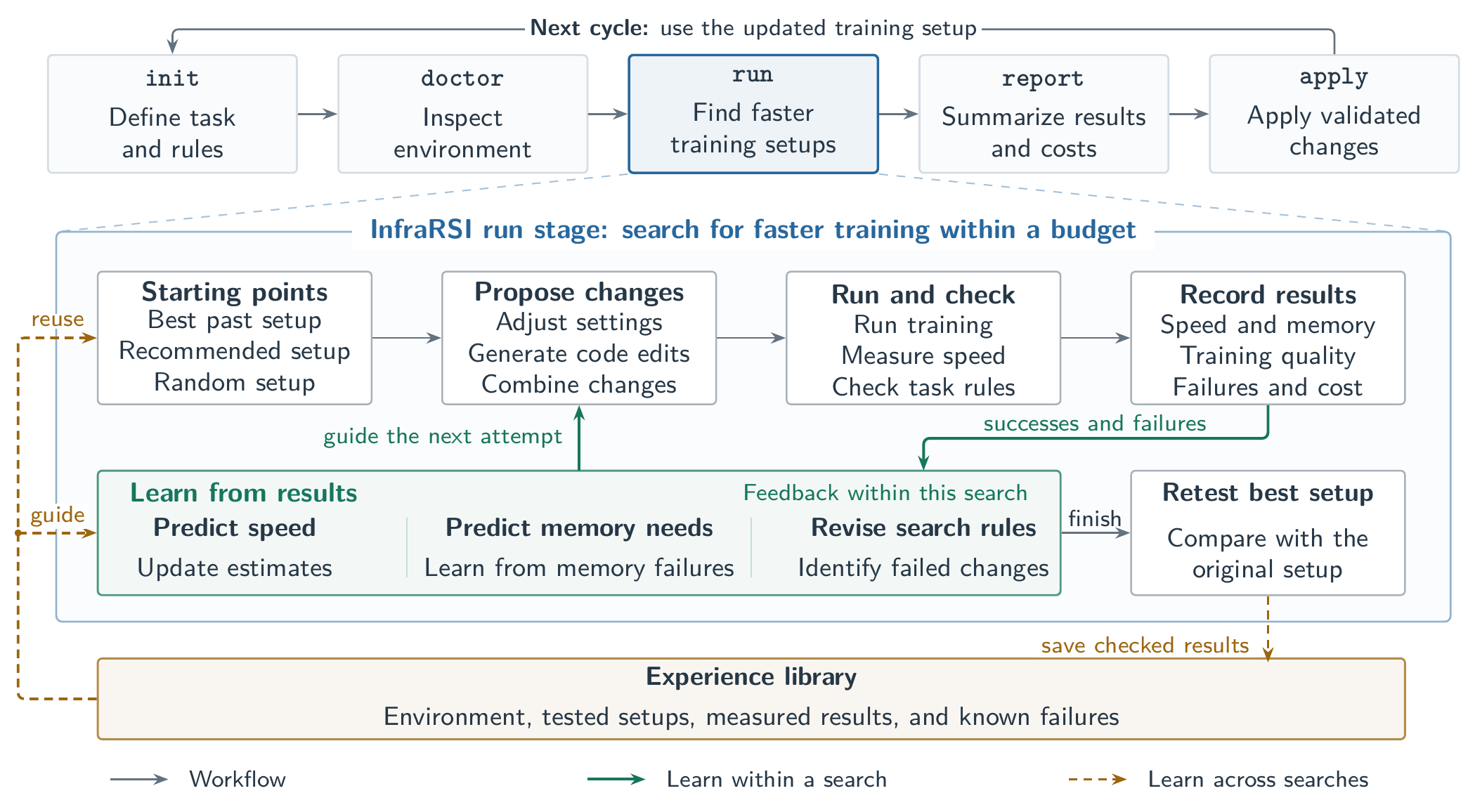
Define task and rules 定义任务与规则
Drafts infrarsi.yaml: entry point, tunable knobs, invariants, which files may be edited, and SHA-256 digests of frozen files (data loaders, evaluation, loss, timers).
生成 infrarsi.yaml:入口、可调旋钮、不变量、允许修改的文件,并记录冻结文件(数据加载、评测、Loss、计时)的 SHA-256 摘要。
Inspect the environment 检查运行环境
Runs the reference job, trims warm-up, calibrates step-time noise, profiles forward / backward / optimizer / data / collective phases, and grades experience coverage. 运行基线任务,剔除预热步,标定步时噪声,剖析前向、反向、优化器、数据与通信各阶段耗时,并评估经验库的覆盖情况。
Find faster training setups 搜索更快的训练配置
Searches launch knobs and code patches, keeps every receipt and cost (failed runs included), re-runs the fastest valid candidates back-to-back with the baseline, and writes result.json, pack.yaml, and REPORT.md.
搜索启动旋钮与代码补丁,保留每次运行的记录与开销(包括失败的运行),把最快的有效候选与基线背靠背复测,并输出 result.json、pack.yaml 与 REPORT.md。
Summarize results and costs 汇总结果与开销
Prints REPORT.md: verifier verdicts, the recommended change, GPU-hours and LLM tokens spent.
输出 REPORT.md:校验结论、推荐改动,以及消耗的 GPU 时长与 LLM Token。
Apply validated changes 应用验证过的改动
Reads the promoted candidate, checks your working tree for conflicts, and writes the new launch configuration and code diffs, optionally on a new git branch. 读取最终入选的候选,检查工作区是否有冲突,然后写入新的启动配置与代码改动,可选择写到新的 git 分支。
How run searches
run 阶段如何搜索
- Several starting points, global speed and memory models. 多起点 + 全局速度与显存模型。 Search starts from the best past setup in the experience library, the LLM's recommended setup, and a random valid setup. Every trial, including out-of-memory failures, updates a step-time model and a censored peak-memory model, so each setting gets an estimated speed gain and memory cost. 搜索同时从经验库中的最佳历史配置、LLM 推荐配置和一个随机合法配置出发。每次试验(包括显存溢出的失败运行)都会更新步时模型与截断峰值显存模型,从而为每个设置估计速度收益与显存代价。
- Correct the LLM, learn from failures, complete bundles. 修正 LLM、从失败中学习、补全组合。 High-impact settings that the LLM rates low are probed directly and its estimates are revised from measurements. Out-of-memory, conflict, and patch failures are attributed separately; a promising setting that runs out of memory is paired with savers that cover the measured shortfall. 对 LLM 低估的高影响设置直接试探,并用实测结果修正其预估。显存溢出、设置冲突与补丁失败分别归因;对显存不足但潜力大的设置,自动搭配能覆盖实测缺口的省显存设置。
- Escape plateaus, stack code patches. 跳出平台期、叠加代码补丁。 When progress stalls, search widens around the high-impact launch settings and restarts from strong earlier runs, while verified code patches are stacked onto stable configurations. 进展停滞时,围绕高影响启动设置扩大搜索范围并从此前表现好的运行重新出发,同时把验证过的代码补丁叠加到稳定配置上。
cd /path/to/your/training/repo
infrarsi init                   # 1. draft infrarsi.yaml
infrarsi doctor                 # 2. reference run, noise floor, phase profile
infrarsi run --llm codex-cli    # 3. search + back-to-back verification
infrarsi report                 # 4. print the newest run's REPORT.md
infrarsi apply                  # 5. show the recommended change
infrarsi apply --write # ...and write it to your filesFour Dense and MoE Workloads on H100 and H200 在 H100 与 H200 上的四个稠密与 MoE 训练负载
Qwen3.5-9B (8×H100), Gemma-4-26B-A4B MoE (8×H200), Qwen3.8-27B (8×H200), and Qwen3.5-35B-A3B MoE (16×H100, 2 nodes), compared with Auto-Research, the METR RE-Bench agent scaffold, and the knob-only tuner OptiCo under identical task contracts. Costs of failed and audit-excluded candidates are kept on the token axis. 在相同任务约定下,于 Qwen3.5-9B(8×H100)、Gemma-4-26B-A4B MoE(8×H200)、Qwen3.8-27B(8×H200)和 Qwen3.5-35B-A3B MoE(16×H100,双节点)上,与 Auto-Research、METR RE-Bench 智能体框架以及仅调配置的 OptiCo 对比。失败与审查剔除的候选所消耗的开销同样计入横轴。
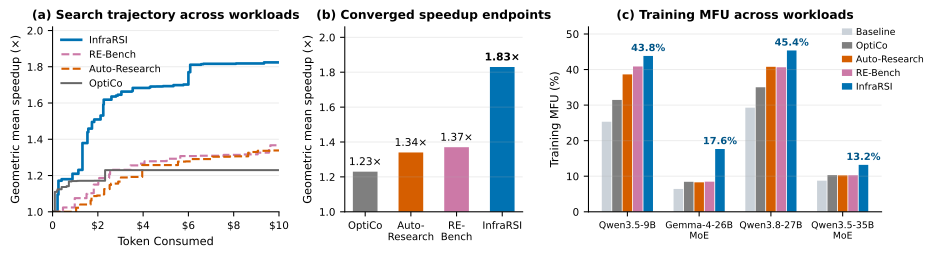
(a) Geometric-mean speedup vs. tokens consumed. (b) Final geometric-mean speedup. (c) Training MFU per workload. (a) 几何平均加速随 Token 消耗的变化;(b) 最终几何平均加速;(c) 各负载的训练 MFU。
| Workload & Hardware 负载与硬件 | Baseline MFU (step) 基线 MFU(单步耗时) | OptiCo | Auto-Research | RE-Bench | InfraRSI |
|---|---|---|---|---|---|
| Qwen3.5-9B (8×H100) | 25.3% (1.62 s) | 1.24× (31.5%) | 1.53× (38.6%) | 1.62× (40.9%) | 1.73× (43.8%) |
| Gemma-4-26B-A4B MoE (8×H200) | 6.4% (3.38 s) | 1.32× (8.4%) | 1.29× (8.3%) | 1.33× (8.5%) | 2.75× (17.6%) |
| Qwen3.8-27B (8×H200) | 29.3% (4.50 s) | 1.19× (35.0%) | 1.39× (40.8%) | 1.38× (40.6%) | 1.55× (45.4%) |
| Qwen3.5-35B-A3B MoE (16×H100, 2 nodes双节点) | 8.7% (1.89 s) | 1.17× (10.3%) | 1.17× (10.2%) | 1.17× (10.3%) | 1.51× (13.2%) |
| Geomean speedup / mean MFU 几何平均加速 / 平均 MFU | 17.4% | 1.23× (21.3%) | 1.34× (24.5%) | 1.37× (25.1%) | 1.83× (30.0%) |
Each cell: speedup over the baseline step time (MFU of the selected setup). MFU uses the non-sparse BF16 peak of 989.5 TFLOP/s per GPU. 每格为相对基线单步耗时的加速比(括号内为所选配置的 MFU)。MFU 以每卡 989.5 TFLOP/s 的非稀疏 BF16 峰值计算。
Gemma-4-26B-A4B MoE · 2.75×
torch.compile + Liger off + recompute off, found by pairing the memory-hungry setting with a saver and banning the compile/Liger conflict, plus a compiled FlexAttention patch that caches block-sparse masks.
torch.compile + 关闭 Liger + 关闭重计算:先把耗显存的设置与省显存设置配对,并排除 compile 与 Liger 的冲突;再加上缓存块稀疏掩码的编译版 FlexAttention 补丁。
Qwen3.5-35B-A3B MoE · 1.51×
32-channel NCCL over InfiniBand (a setting the LLM prior rated as a slight slowdown, measured at +10.2%), plus fused SwiGLU, fast zero-grad, and bucketed gradient-norm all-reduce patches. InfiniBand 上 32 通道 NCCL(LLM 先验认为会略微变慢,实测 +10.2%),叠加融合 SwiGLU、快速梯度清零与分桶梯度范数 all-reduce 补丁。
Qwen3.5-9B · 1.73× / Qwen3.8-27B · 1.55×
Memory-saving knobs paired with fused normalization, rotary-embedding, and MLP kernels lift dense-model MFU to 43.8% and 45.4%. 省显存旋钮与融合归一化、旋转位置编码和 MLP 算子配合,把两个稠密模型的 MFU 分别提升到 43.8% 和 45.4%。
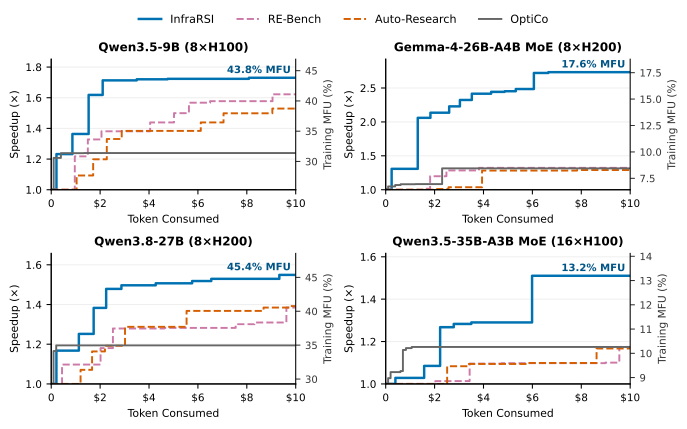
Per-workload speedup (left axis) and training MFU (right axis) against tokens consumed. 各负载的加速比(左轴)与训练 MFU(右轴)随 Token 消耗的变化。
Cross-hardware experience transfer 跨硬件经验迁移
On Qwen3.5-9B (8×H100), experience gathered on other GPU types (with same-task, same-GPU history excluded) gives the highest final speedup and is the only setting that reaches 90% of the peak log-speedup within the budget. 在 Qwen3.5-9B(8×H100)上,只使用其他 GPU 型号上积累的经验(排除同任务、同型号的历史记录)时,最终加速最高,也是唯一在预算内达到 90% 峰值对数加速的设置。
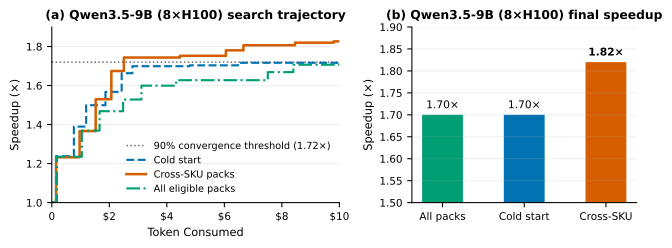
| Experience setting 经验设置 | Final speedup 最终加速 | Trials to 90% of peak 达到 90% 峰值所需试验数 | GPU-hours to 90% of peak 达到 90% 峰值所需 GPU 时 |
|---|---|---|---|
| Cold start (no experience) 冷启动(不使用经验) | 1.70× | not reached (>15) 未达到(>15) | — |
| All eligible packs 使用全部可用经验包 | 1.70× | not reached (>17) 未达到(>17) | — |
| Cross-SKU transfer (other GPU types only) 跨型号迁移(仅用其他 GPU 型号的经验) | 1.82× | 9 | 2.97 |
Why Not Just a Coding Agent? 为什么不能只用编程智能体?
Training throughput depends on tightly coupled launch settings, operator kernels, and communication schedules across Megatron-Core, FSDP2/TorchTitan, DeepSpeed, HF Trainer/TRL, and PyTorch DDP. Pointing an unconstrained coding agent or a greedy tuner at such a job runs into four recurring problems, and InfraRSI is built around each of them. 训练吞吐取决于 Megatron-Core、FSDP2/TorchTitan、DeepSpeed、HF Trainer/TRL 与 PyTorch DDP 中紧密耦合的启动配置、算子实现与通信调度。直接让无约束的编程智能体或贪心调参器去优化这类任务,会反复遇到以下四类问题,InfraRSI 针对每一类都有对应设计。
Fake Speedups 虚假加速
Open-ended edits can look faster by shrinking the effective batch, pushing optimizer work past the timing window, or casting to an unapproved low precision. InfraRSI fixes the task contract up front, checks 16 invariants on every run, and audits the code path of the winning candidate. 不受约束的代码修改可能通过缩小有效 batch、把优化器更新推到计时窗口之外、或使用未允许的低精度来"变快"。InfraRSI 事先锁定任务约定,每次运行都检查 16 项不变量,并对胜出候选的代码路径做审查。
Measurement Noise 测量噪声
Paired step-time noise ranges from 0.04%–0.10% on dedicated 8×H100 and 8×H200 nodes to over 6% on shared hosts. A fixed 2% gate drops real 0.5%–1.5% gains on quiet clusters and still admits jitter on noisy ones, so doctor calibrates the noise floor of your cluster before search starts.
成对步时噪声在独占的 8×H100、8×H200 节点上仅 0.04%–0.10%,在共享主机上可超过 6%。固定 2% 的阈值会在安静集群上丢掉 0.5%–1.5% 的真实收益,在嘈杂集群上又放过随机抖动,因此 doctor 会在搜索前标定你所在集群的噪声水平。
Unreliable LLM Speed Guesses LLM 的速度预估不可靠
Zero-shot speedup predictions correlate negatively with measured results (Spearman r ∈ [−0.49, −0.06]). The prior expected +2.0% from graph compilation on Gemma-4-26B-A4B MoE, which actually gave +55%. InfraRSI probes high-impact settings the LLM rates low and corrects its priors from live measurements. LLM 零样本预测的加速与实测结果呈负相关(Spearman r ∈ [−0.49, −0.06])。在 Gemma-4-26B-A4B MoE 上,它预测图编译只带来 +2.0%,实测却是 +55%。InfraRSI 会主动试探被 LLM 低估的高影响设置,并用实测数据修正其先验。
Out-of-Memory Walls 显存墙
Many fast settings only work in combination. On Gemma-4-26B-A4B MoE, turning off activation recomputation alone is 18 GiB short; InfraRSI pairs it with a 14 GiB memory saver, resolves a compiler conflict, and adds a FlexAttention patch to reach 2.75×. 很多加速设置必须组合起来才能跑通。在 Gemma-4-26B-A4B MoE 上,单独关闭激活重计算会缺 18 GiB 显存;InfraRSI 把它与可省 14 GiB 的设置配对、消除编译冲突,再叠加 FlexAttention 补丁,最终达到 2.75×。
A Faster Job That Is Still the Same Job 更快,但仍是同一个训练任务
Every candidate is compared with your reference run under 16 invariants in five layers. Loss tolerances are fixed before search begins (default 3% relative deviation), and a candidate that fails any check is rejected while its cost stays in the ledger. When no candidate passes promotion, InfraRSI keeps your original setup. 每个候选都与你的基线运行对比,接受五层共 16 项不变量检查。Loss 容差在搜索开始前就已固定(默认相对偏差 3%),任何一项不通过即被拒绝,但其开销仍记入账本。如果没有候选通过最终晋级检查,InfraRSI 会保留你原来的配置。
| Layer 层级 | Checks 检查项 | What must hold 要求 |
|---|---|---|
| L1 · Execution执行 | completes, no_errors, memory_cap |
Exit 0 after every requested update; no NaN, OOM, NCCL error, or traceback; peak memory within the cap. 跑完全部更新步并以 0 退出;无 NaN、OOM、NCCL 错误或异常栈;峰值显存不超上限。 |
| L2 · Workload负载 | same_workload, same_data, same_model, frozen_files |
Same tokens per update and sequence length, same data and model digests, frozen files unchanged. 每步 Token 数与序列长度不变,数据与模型摘要一致,冻结文件未被修改。 |
| L3 · Schedule调度 | optimizer_steps |
The same number of optimizer steps, all inside the timed window. 优化器步数一致,且全部发生在计时窗口内。 |
| L4 · Numerical数值 | loss_within_tolerance, grad_norm_within_tol, precision, eval_matches |
Loss within the declared tolerance of the reference; precision stays within the allowed menu. Loss 与基线的偏差在声明容差之内;数值精度不超出允许范围。 |
| L5 · Timing & re-run计时与复测 | timing_consistent, speed_reproduces, resume_continues, user_tests |
InfraRSI's own clock agrees with the logged step time; a fresh back-to-back re-run keeps the speedup beyond calibrated noise. InfraRSI 自身计时与日志中的步时一致;新的背靠背复测中,加速幅度仍超出标定噪声。 |
Verifier test matrix 校验器测试矩阵
All 28 single-perturbation receipts are rejected and all 12 benign variants are accepted. 28 个单点篡改样例全部被拒绝,12 个正常变体全部被接受。
Offline re-check 离线复核
Re-judging 1,212 stored executions rejects 400 (33.0%), including 39 (3.2%) that only the numerical layer L4 catches. 重新判定 1,212 次历史运行,拒绝 400 次(33.0%),其中 39 次(3.2%)只有数值层 L4 能发现。
Stable across tolerances 对容差设置稳定
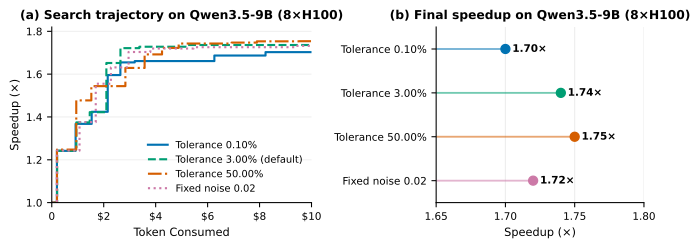
On Qwen3.5-9B, loss tolerances of 0.10%, 3.00%, and 50.00% and a fixed 2.00% noise floor all reach the common 90% threshold within 10–11 trials. 在 Qwen3.5-9B 上,Loss 容差取 0.10%、3.00%、50.00% 以及固定 2.00% 噪声阈值时,都能在 10–11 次试验内达到共同的 90% 阈值。
Stop When the Goal Is Met or the Budget Runs Out 达到目标或预算用完即停止
Targets and budgets can be combined freely. Reaching a target ends the search; the normal independent promotion checks still run before anything is recommended. 目标与预算可以任意组合。一旦达到目标即结束搜索,但在给出推荐之前,仍会照常执行独立的晋级检查。
Target speedup 目标加速比
Stop once a valid full run reaches this speedup over the reference. Must be greater than 1. 某次有效的完整运行达到该加速比后即停止,取值须大于 1。
Target MFU 目标 MFU
Stop at this Model FLOPs Utilization, given as a fraction (0.45) or a percentage number (45).
达到该 MFU 即停止,可写成小数(0.45)或百分数数值(45)。
Wall-clock limit 运行时长上限
Accepts 90m, 2h, 3600s, or plain hours. --wall-hours is the same option.
支持 90m、2h、3600s 或直接写小时数。--wall-hours 是同一选项。
Token budget Token 预算
Accepts an integer, 500k, or 1.5M. --budget-tokens is the same option; --budget-usd caps dollar spend instead.
支持整数、500k 或 1.5M。--budget-tokens 是同一选项;若要限制美元花费,请用 --budget-usd。
How the token budget is spent Token 预算如何分配
Prompts shrink as the budget runs low instead of stopping abruptly in the middle of a round. Once tokens are exhausted, already prepared patches and eligible memory or exploration moves can still use the remaining full runs; screen, wall-clock, and GPU limits always apply. 预算接近用完时,提示词会逐步压缩,而不是在一轮中途突然中断。Token 用尽后,已准备好的补丁以及符合条件的显存或探索类尝试仍可使用剩余的完整运行次数;运行次数、时长与 GPU 上限始终有效。
- Normal: 正常区: up to 12k tokens of code context, full history, optional revision calls. 代码上下文最多 12k Token,完整历史,允许可选的修订调用。
- Economy 节流区 (65–88% used or fewer than 32k tokens left): 4k tokens of code, half the history, no revision calls, at most 4 hypotheses per call. (已用 65–88% 或剩余不足 32k):代码 4k Token,历史减半,不做修订调用,每次最多 4 个假设。
- Wind-down 收尾区 (≥ 88% used or fewer than 12k left): 1.5k tokens of code, a quarter of the history, at most 2 hypotheses per call. (已用 ≥ 88% 或剩余不足 12k):代码 1.5k Token,历史保留四分之一,每次最多 2 个假设。
- Codex CLI cache: Codex CLI 缓存: cached input tokens count at 10%, so the CLI's fixed system prefix does not drain the budget. 缓存命中的输入 Token 按 10% 计入,CLI 固定的系统前缀不会白白耗掉预算。
infrarsi optimize ./train.sh \
  --llm codex-cli \
  --target-speedup 1.8 \
  --target-mfu 45 \
  --max-wallclock 2h \
--token-budget 500kCommands and Flags, with Examples 命令与参数(附示例)
Every flag below comes with a command you can copy. Flags that tune the search work with both infrarsi optimize and infrarsi run.
下面每个参数都附有可直接复制的命令。与搜索相关的参数同时适用于 infrarsi optimize 和 infrarsi run。
Commands 命令
One command for all five stages. The target can be a launch script, a Python entry, a repository, or an infrarsi.yaml.
一条命令跑完五个阶段。目标可以是启动脚本、Python 入口、代码仓目录或 infrarsi.yaml。
infrarsi optimize ./train.sh --llm claude-cli
infrarsi optimize ./train.py --llm codex-cli
infrarsi optimize /path/to/repo --llm deepseek
infrarsi ./train.sh --llm codex-cli   # shorthand
Draft infrarsi.yaml for a repository or script. --force replaces an existing one.
为代码仓或脚本生成 infrarsi.yaml;--force 会覆盖已有文件。
infrarsi init
infrarsi init ./train.sh --force
infrarsi init . --entry pretrain.py --config configs/7b.yamlOne reference run: signals, checklist coverage, noise floor, and experience coverage. 执行一次基线运行,检查日志信号、检查项覆盖、噪声水平与经验覆盖情况。
infrarsi doctor
infrarsi doctor ./infrarsi.yaml --experience off
Reference run, search, verified promotion, and report, using an existing infrarsi.yaml.
基于已有的 infrarsi.yaml 执行基线运行、搜索、验证晋级与报告。
infrarsi run --llm codex-cli
infrarsi run ./infrarsi.yaml --llm claude:opus --screens 24
Print the report of a run. Without an argument, the newest run under .infrarsi/runs.
打印某次运行的报告;不带参数时读取 .infrarsi/runs 下最新的一次。
infrarsi report
infrarsi report .infrarsi/runs/<run-dir>
Show the recommended change; --write writes it, --branch puts it on a new git branch.
显示推荐改动;加 --write 才会写入文件,--branch 可写到新的 git 分支。
infrarsi apply
infrarsi apply --write
infrarsi apply --write --branch infrarsi/speedupExperience packs: check statistics, validate a pack, or export a run's pack for sharing. 经验包工具:查看统计、校验经验包,或把某次运行的经验包导出分享。
infrarsi exp stats
infrarsi exp validate my_pack.jsonl
infrarsi exp export .infrarsi/runs/<run-dir> --out my_pack.jsonl \
--pack-id h100-qwen-9b --title "Qwen3.5-9B on 8xH100"Compile requirements written in your own words and show what each one means for this project. Runs no training. 把自然语言需求转换成具体约束,并展示每条需求对当前项目意味着什么;不运行训练。
infrarsi requirements
infrarsi requirements --text "不能改优化器" --text "batch 不能超过 4"
infrarsi requirements --file req.txt --llm claude-cli --refreshRe-verify the best candidates of a run that stopped early (killed, disconnected) and adopt the winner. 对提前中断(被杀、断连)的运行,重新验证目前最好的候选并采用胜出者。
infrarsi finish
infrarsi finish .infrarsi/runs/<run-dir> --dry-run
infrarsi finish --branch infrarsi/speedup
Flags 参数
| Flag 参数 | What it does 作用 | Example 示例 |
|---|---|---|
| LLM backend大模型后端 | ||
--llm <backend[:model]> |
Backends: claude-cli/claude, codex-cli/codex, deepseek, anthropic, openai, openai-compat, vllm, none. Without it, optimize detects API keys and CLI logins.
可选 claude-cli/claude、codex-cli/codex、deepseek、anthropic、openai、openai-compat、vllm、none。不指定时,optimize 会自动检测 API Key 与 CLI 登录态。
|
|
--api-base <url> |
Override the endpoint URL of the selected API backend. 覆盖所选 API 后端的接口地址。 | |
--api-key-env <VAR> |
Name of the environment variable that holds the API key. 存放 API Key 的环境变量名。 | |
--capability <0..1> |
How much to trust the LLM. Low values restrict it to rating enumerated changes; high values allow free-form hypotheses and larger patches. Inferred from the model name by default. 对 LLM 的信任程度。值低时只让它为列举出的改动打分;值高时允许自由提出假设和更大的补丁。默认根据模型名推断。 | |
| Budgets and targets预算与目标 | ||
--screens <n> / --trials |
Search budget in full training runs (default 16). 以完整训练运行次数计的搜索预算(默认 16)。 | |
--budget-usd <usd> |
Search budget in LLM dollars. 以美元计的 LLM 搜索预算。 | |
--token-budget <n> / --budget-tokens |
LLM token budget: an integer, 500k, or 2M.
LLM Token 预算:整数、500k 或 2M。
|
|
--max-wallclock <dur> / --wall-hours |
Wall-clock budget: hours, 2h, 90m, or 3600s.
运行时长预算:小时数、2h、90m 或 3600s。
|
|
--target-speedup <x> |
Stop after a valid full run reaches this speedup (> 1). 某次有效完整运行达到该加速比(须 > 1)后停止。 | |
--target-mfu <v> |
Stop at this MFU, as a fraction or a percentage number. 达到该 MFU 即停止,可写小数或百分数数值。 | |
| Verification and experience验证与经验 | ||
--tolerance <f> |
Accepted relative loss deviation (default 0.03). 可接受的相对 Loss 偏差(默认 0.03)。 | |
--experience <sel> |
Experience packs to use: auto (default, all), off, or comma-separated pack-id patterns.
使用哪些经验包:auto(默认,全部)、off,或用逗号分隔的经验包 ID 模式。
|
|
| Project setup (optimize / init)项目设置(optimize / init) | ||
--entry <file> |
The training entry script, relative to the repository root. 训练入口脚本(相对代码仓根目录)。 | |
--config <file> |
The job's config file; its values become the reference. 训练任务的配置文件,其中的值作为基线参考。 | |
--command "<cmd>" |
The command line the job runs with today; its flags become the knob defaults. 当前实际使用的启动命令;其中的参数会成为旋钮的默认值。 | |
--force |
Re-draft infrarsi.yaml even if one already exists.
即使已存在 infrarsi.yaml 也重新生成。
|
|
--no-doctor |
Skip doctor and go straight to run.
跳过 doctor,直接进入 run。
|
|
--dry-run |
Preview the apply diff without writing files.
只预览 apply 的改动,不写入文件。
|
|
--branch <name> |
Git branch to write the applied changes on. 写入改动所用的 git 分支。 | |
| Startup Q&A, requirements, dual model启动问答、自然语言需求、双模型 | ||
--interactive / --no-interactive |
Force the startup questions on or off. Default: on in a terminal, off in scripts and pipes. 强制开启或关闭启动问答。默认在终端中开启,在脚本和管道中关闭。 | |
-y, --yes |
No questions: use the settings as they are. 不提问,直接使用当前设置。 | |
--requirements "<text>" |
A requirement in your own words for this run; repeatable, any language. With init, it is stored in infrarsi.yaml.
本次运行的一条自然语言需求,可重复使用,任意语言。用于 init 时会写入 infrarsi.yaml。
|
|
--requirements-file <file> |
Requirements read from a text file. 从文本文件读取需求。 | |
--requirements-partial |
Run even when some requirements cannot be honoured; this is recorded in the report. 即使部分需求无法满足也继续运行,并在报告中记录。 | |
--no-requirements |
Ignore the requirements in infrarsi.yaml for this run.
本次运行忽略 infrarsi.yaml 中的需求。
|
|
--second-llm <backend[:model]> |
Second model for the dual-model mode; setting it turns the mode on. Same forms as --llm.
双模型机制中的第二个模型;设置后即开启双模型。写法与 --llm 相同。
|
|
--verifier-llm <backend[:model]> |
Model that checks code patches before they run. Default: the model that did not write the patch; none turns the check off.
在代码补丁运行前负责审查的模型。默认为没有编写该补丁的模型;设为 none 则不检查。
|
|
--debate / --no-debate |
Turn the dual-model mode on or off for this run, overriding debate.enabled in infrarsi.yaml (default off).
本次运行开启或关闭双模型机制,覆盖 infrarsi.yaml 中的 debate.enabled(默认关闭)。
|
|
--on-interrupt verify|stop |
What Ctrl-C does during the search: verify (default) re-verifies the best candidates and adopts the winner; stop ends at once.
搜索中按 Ctrl-C 的行为:verify(默认)重新验证最佳候选并采用胜出者;stop 立即结束。
|
|
| Runs and output运行与输出 | ||
--resume <run-dir> (run) |
Continue a run from its search-state checkpoint; amounts already used count toward the new budget. 从某次运行的搜索状态检查点继续;已用掉的预算计入新的预算。 | |
--out <dir> |
Runs directory (default .infrarsi/runs in the working directory).
运行结果目录(默认为工作目录下的 .infrarsi/runs)。
|
|
-v, --verbose |
Print every progress line, not only milestones (all lines are in run.log).
打印全部进度信息,而不仅是里程碑(完整内容始终保存在 run.log)。
|
|